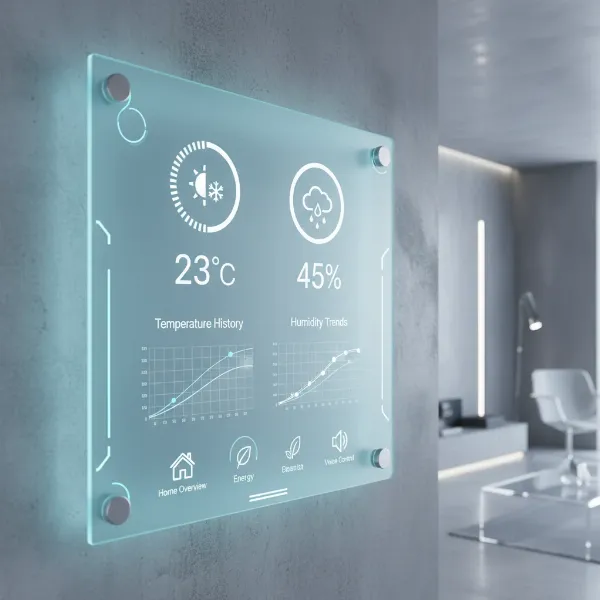
In our modern homes and workplaces, invisible forces constantly shape our comfort and well-being. Among these, humidity stands out as a critical, yet often overlooked, factor. From safeguarding delicate wooden furniture to protecting our respiratory health, monitoring the moisture in the air is more important than many realize. As an expert with over a decade in testing and evaluating digital hygrometers, I’ve seen how these compact devices can transform an environment, turning guesswork into precise control. Let’s delve into the world of digital hygrometers and uncover the optimal solutions for maintaining a healthy and comfortable living space.
What is a Digital Hygrometer? Why Do You Need One?
A digital hygrometer is an electronic device designed to measure the amount of water vapor present in the air, commonly expressed as Relative Humidity (RH). These instruments typically utilize advanced sensors, either resistive or capacitive, to detect changes in moisture levels. When exposed to air, the moisture-absorbent material within the sensor changes its electrical properties. For instance, capacitive sensors measure variations in electrical capacitance as their film absorbs or releases moisture, while resistive sensors detect changes in electrical resistance. These electrical signals are then converted into a clear, digital reading, providing an instant and precise display of the ambient humidity.
Monitoring humidity is not merely about comfort; it’s a crucial aspect of maintaining a healthy indoor environment and preserving your belongings. Both excessively high and low humidity levels can lead to a range of problems. Low humidity, often considered anything below 30-40% RH, can cause dry skin, irritated eyes, and respiratory discomfort, potentially leading to dryness, coughing, and nosebleeds. It can also make individuals more susceptible to respiratory infections. Conversely, high humidity, typically above 50-60% RH, creates an ideal breeding ground for mold, mildew, dust mites, and bacteria, which can trigger allergies and aggravate respiratory conditions like asthma. The Environmental Protection Agency (EPA) and health experts generally recommend maintaining indoor relative humidity levels between 30% and 50% for optimal health and comfort.
Beyond personal well-being, humidity plays a significant role in the longevity of your home and its contents. Low humidity can draw moisture from wooden furniture, floors, and musical instruments, leading to cracking, warping, and irreversible damage. It can also harm sensitive electronics. High humidity, on the other hand, can cause paint to peel, wood to rot, and linens to feel damp, while actively fostering mold growth on various surfaces. A digital hygrometer provides the critical data needed to identify when your environment falls outside this ideal range, allowing you to take corrective action, such as using a humidifier to add moisture or a dehumidifier to remove it, thereby safeguarding both your health and your investments.
Popular Types of Digital Hygrometers
The market offers a diverse range of digital hygrometers, each designed to suit specific needs and environments. While they all share the core function of measuring humidity digitally, their form factors and additional features vary significantly. Most contemporary hygrometers are electronic, relying on precise capacitive or resistive sensors for their measurements.
Digital Hygrometer for Desktops and Tabletops
|
Our Picks for the Best Digital hygrometer in 2026
As an Amazon Associate I earn from qualifying purchases.
|
||
| Num | Product | Action |
|---|---|---|
| 1 | Humidity Meter Indoor Thermometer 6-Pack Mini Digital Thermometer Hygrometer Indoor Temperature Humidity Meters Gauge LCD Display Fahrenheit (℉) for Greenhouse, Reptile Tank, Cellar, Closet |

|
| 2 | TempPro TP49 Digital Hygrometer Indoor Thermometer Humidity Meter Room Thermometer with Temperature and Humidity Monitor Mini Hygrometer Outdoor Thermometer (Previously ThermoPro) |
|
| 3 | JEDEW 2 Pack Hygrometer Thermometer Digital Humidity Meter Indoor/Outdoor Humidity Monitor Reptile Thermo-Hygrometer for Greenhouse Humidors Terrarium Jars, Fahrenheit (℉) /Celsius(℃) (2) |
|
| 4 | JEDEW 4 Pack Hygrometer Thermometer Digital Humidity Meter Indoor/Outdoor Humidity Monitor Reptile Thermo-Hygrometer for Greenhouse Humidors Terrarium Jars, Fahrenheit (℉) /Celsius(℃) (4) |
|
| 5 | TempPro TP50 Digital Hygrometer Indoor Thermometer Room Thermometer and Humidity Gauge with Temperature Humidity Monitor(Previously ThermoPro) |
|
| 6 | TempPro TP49 3 Pieces Digital Hygrometer Indoor Thermometer Humidity Meter Mini Hygrometer with Temperature and Humidity Monitor Outdoor and Room Thermometer Weather Station (Previously ThermoPro) |
|
| 7 | Govee Bluetooth Hygrometer Thermometer, Large LCD, Max/Min Records, 2-Year Data Storage - Black, 2 Pack |
|
| 8 | 6-Pack Mini Hygrometer Indoor Humidity Meter, Mini Digital Thermometer Humidity Gauge Meter, Indoor Thermometer Hygrometer Monitor Fahrenheit (℉) for Reptile Thermostat, Jars Reptile, Fridge |
|
| 9 | TempPro TP50 2 Pieces Digital Hygrometer Indoor Thermometer Room Thermometer and Humidity Gauge with Temperature Humidity Monitor(Previously ThermoPro) |
|
| 10 | Mini Hygrometer Thermometer Digital Humidity Meter Indoor/Outdoor Humidity Monitor Reptile Thermometer for Greenhouse Garden Cellar Fahrenheit(℉)/ Celsius(℃) 2 Pack |
|
These models are often designed with larger, easy-to-read displays and sometimes include additional features like temperature readings, time, and alarm functions. They are ideal for monitoring a fixed location, such as a living room, bedroom, or office, where portability is not a primary concern. Many desktop hygrometers feature a built-in kickstand, allowing them to be placed prominently on a flat surface for continuous, at-a-glance monitoring. While less mobile, their robust feature sets and clear displays make them a popular choice for general home use.
Wall-Mounted Digital Hygrometer
For those looking to save desk space or integrate monitoring seamlessly into their décor, wall-mounted digital hygrometers are an excellent option. These devices often come with built-in keyholes, magnets, or clips, allowing for versatile placement on walls, refrigerators, or other vertical surfaces. They offer the advantage of being easily visible from a distance without occupying valuable tabletop real estate. While often having similar features to their desktop counterparts, their design prioritizes unobtrusive, fixed placement for consistent environmental observation.
Handheld Digital Hygrometer
Portability is the hallmark of handheld digital hygrometers. These compact, lightweight devices are perfect for users who need to take measurements in multiple locations or on the go. Whether you’re checking conditions in different rooms, assessing moisture in a crawl space, or monitoring humidity in a travel humidor, a handheld unit offers flexibility. While some smaller models might feature more compact displays and fewer advanced functions than larger units, their mobility makes them indispensable for versatile applications where quick spot-checks are essential.
Smart and Wireless Digital Hygrometer
Advancements in technology have led to the proliferation of smart and wireless digital hygrometers. These devices often integrate Bluetooth or Wi-Fi connectivity, allowing users to monitor humidity and temperature remotely via a smartphone app. Many smart hygrometers offer advanced features such as data logging, historical graphs, customizable alerts for high or low humidity, and integration with smart home systems. Some even come with multiple remote sensors, enabling simultaneous monitoring of various areas, from outdoor conditions to specific enclosures like greenhouses or wine cellars. This connectivity provides unparalleled convenience and detailed insight into environmental trends, making them a premium choice for comprehensive home or industrial climate control.
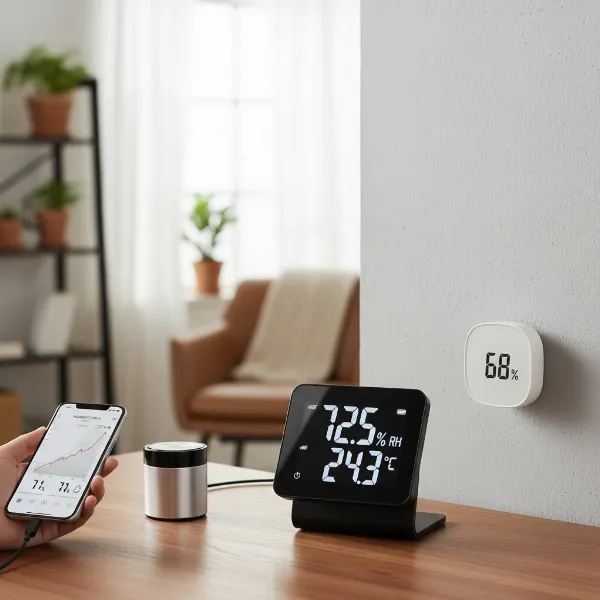 Different types of digital hygrometers including desktop, wall-mounted, and smart portable models on various surfaces.
Comparison Table: Best Digital Hygrometers Today
Choosing the right digital hygrometer can be daunting given the array of options. To help simplify your decision, here’s a comparison of some highly-rated models, considering their key specifications, features, and reported user experiences.
| Model | Brand | Price Range | Accuracy (RH/Temp) | Key Features | Ideal Use Cases |
|---|---|---|---|---|---|
| Ambient Weather WS-10 | Ambient Weather | Mid-High | ±2-3% RH, ±1°F | 8-channel, indoor/outdoor, 3 remote sensors, audible/visual alarms, LCD display | Comprehensive home monitoring, multiple rooms/areas |
| Govee H5051 Wi-Fi Indoor Hygrometer | Govee | Mid | ±3% RH, ±0.54°F | Wi-Fi & Bluetooth, app monitoring, data export, adjustable alerts | Smart home integration, remote monitoring |
| Govee H5075 Bluetooth Hygrometer Thermometer | Govee | Low-Mid | ±3% RH, ±0.5°F | Bluetooth, large LCD, 2-second refresh, 2-year data storage, app notifications | Budget-friendly smart monitoring, single room |
| ThermoPro TP49 Digital Hygrometer | ThermoPro | Low | ±2-3% RH, ±1°F | 18-month battery, 10-second refresh, comfort level indicator | Basic home use, nurseries, quick comfort checks |
| AcuRite 00613 Digital Hygrometer | AcuRite | Low | ±3-5% RH, ±2°F | Versatile placement (magnet, kickstand), 24-hour min/max records, comfort icon | General home use, reptile enclosures, plant care |
| SensorPush HT.w Temperature/Humidity Smart Sensor | SensorPush | High | ±2% RH, ±0.36°F | Bluetooth (325 ft range), app calibration, robust data logging, compact | Precision monitoring for cigars, instruments, greenhouses |
Note: Price ranges are approximate and can vary based on retailer and promotions.
How to Choose the Right Digital Hygrometer (Buying Guide)
Selecting the ideal digital hygrometer involves carefully considering your specific needs, the environment you wish to monitor, and the features that matter most to you. Don’t rush into a purchase; a well-informed decision will ensure you get a device that provides accurate, reliable data for years to come.
Identify Your Usage Needs
Start by asking yourself where and why you need a hygrometer. Are you looking to monitor the general humidity in your living room for comfort, or do you require precise control for a delicate cigar humidor, a musical instrument case, a greenhouse, or a baby’s nursery? Your intended application will largely dictate the necessary level of accuracy, specific features, and even the form factor. For instance, a dedicated humidor might benefit from a compact, highly accurate unit, while a large home may require multiple sensors or a smart system with remote monitoring capabilities. Consider if you need to track humidity in a single spot or multiple locations simultaneously.
Key Factors to Consider When Buying
Once you’ve identified your primary needs, evaluate these critical factors to narrow down your choices:
- Accuracy and Resolution: This is paramount for any measuring device. Look for hygrometers with a low error margin, typically ±2-5% for humidity and ±0.5-2°F for temperature. Higher precision models, often within ±2% RH and ±0.36°F, are essential for sensitive applications like wine cellars or instrument storage. Resolution refers to the smallest change the device can detect (e.g., 0.1% RH).
- Measurement Range: Ensure the device can accurately measure humidity and temperature within the expected extremes of your environment. Typical ranges might be 10-99% RH and -50°C to 70°C (-58°F to 158°F).
- Response Time: How quickly does the hygrometer update its readings? A faster refresh rate (e.g., every 2-10 seconds) provides more real-time data, which can be crucial for detecting rapid changes.
- Battery Life (for wireless models): If you opt for a wireless unit, a long battery life (e.g., 6-18 months) means less frequent maintenance.
- Display: A large, clear LCD screen with bold digits is easier to read from a distance. Backlighting is a significant plus for low-light conditions.
- Additional Features: Consider if you need functions like minimum/maximum readings, trend arrows, comfort level indicators, audible or visual alarms, data logging capabilities, or smart connectivity (Bluetooth, Wi-Fi) for remote monitoring and alerts via an app.
- Brand and Reviews: Stick to reputable brands known for quality and reliability. Check recent user reviews for insights into real-world performance, common issues, and customer support.
Budget Considerations
Digital hygrometers vary widely in price, from budget-friendly mini units costing under $15 to advanced smart systems that can cost over $100. Entry-level models typically offer basic humidity and temperature readings with decent accuracy for general use. Mid-range options often add better accuracy, larger displays, and perhaps basic Bluetooth connectivity. High-end devices usually boast superior accuracy, Wi-Fi integration, extensive data logging, multiple remote sensors, and robust app features. Determine your budget but remember that investing a little more in a precise and reliable unit can prevent potential damage to valuable items or health issues down the line.
How to Use and Maintain Your Digital Hygrometer
Proper usage and regular maintenance are essential to ensure your digital hygrometer provides accurate and reliable readings over its lifespan. While most models are designed for ease of use, a few best practices can significantly enhance their performance and longevity.
Proper Usage
- Read the User Manual: Always start by consulting the manual specific to your hygrometer model. Different devices may have unique features, placement recommendations, or calibration instructions.
- Optimal Placement: Position your hygrometer in the central area where you want to measure humidity, ideally about 3 to 5 feet off the ground. Crucially, keep it away from direct sunlight, air vents, drafts, heating sources (like radiators or heat lamps), and direct sources of moisture (like humidifiers or open windows). These factors can significantly skew readings. For specific enclosures like humidors, place it at mid-level, away from humidification devices.
- Allow for Stabilization: When first setting up or moving your hygrometer to a new environment, allow it a stabilization period, typically 15-30 minutes, before taking official readings. This gives the sensors time to acclimate to the new conditions.
- Remote Monitoring (Smart Hygrometers): If you have a smart hygrometer with Bluetooth or Wi-Fi, download the accompanying app. This will enable remote monitoring, historical data tracking, and custom alerts for humidity fluctuations, offering a more comprehensive overview of your environment.
Essential Maintenance
- Regular Cleaning: Dust and dirt can accumulate on the sensor and casing, potentially affecting accuracy. Gently clean the device regularly with a soft, dry cloth. Avoid using harsh chemicals or abrasive materials, and never touch the sensing element directly with your bare hands, as oils can interfere with its function.
- Battery Management: For battery-powered digital hygrometers, periodically check the battery indicator. Replace batteries promptly when they run low to prevent inaccurate readings or device malfunction. Always use the type and size of battery recommended by the manufacturer.
- Consistent Calibration: Even high-quality sensors can experience “drift” over time due to environmental factors or general wear. Regular calibration, ideally every 6 to 12 months, is crucial for maintaining accuracy. The most common and reliable method is the salt test (detailed in the troubleshooting section), which provides a stable 75% RH baseline for comparison. If your hygrometer doesn’t have a calibration button, you may need to note the offset and manually adjust future readings.
By following these guidelines, you can ensure your digital hygrometer remains a trustworthy tool for managing your indoor environment, contributing to a healthier and more comfortable space.
Common Issues and Troubleshooting for Digital Hygrometers
Even with the best digital hygrometers, you might occasionally encounter issues. Understanding common problems and how to troubleshoot them can save you time and ensure your device remains a reliable source of information.
Inaccurate Readings or Sensor Drift
This is perhaps the most common complaint among hygrometer users.
- Causes: Sensor drift can occur due to prolonged use, exposure to extreme temperatures or humidity, dust accumulation on the sensor, or even low battery power. Poor placement, such as near a draft, heat source, or direct sunlight, can also lead to skewed readings, making the device appear inaccurate.
- Fixes:
- Check Placement: Relocate the hygrometer to a stable spot away from direct environmental influences. Ensure good airflow around the device.
- Replace Batteries: If your device is battery-powered, install fresh batteries. Low power can sometimes lead to inconsistent or incorrect readings.
- Clean the Sensor: Gently clean the device, ensuring no dust or debris obstructs the sensor.
- Calibrate: The most effective solution for sensor drift is calibration. This involves resetting the device’s accuracy against a known standard. The salt test is a widely recommended method.
“Out of Range” or Dashed Readings
Some digital hygrometers may display “LO” or “HI” (or dashes) if the humidity or temperature falls outside their specified measurement range.
- Causes: The environment is genuinely too dry, too humid, too hot, or too cold for the device’s capabilities.
- Fixes:
- Verify Environment: Check the actual conditions using another reliable instrument if possible, or assess if the conditions are indeed extreme.
- Device Limits: Understand your hygrometer’s operating limits. If you consistently need to measure outside these limits, consider investing in a model with a wider measurement range.
Slow Response Time
If your hygrometer seems to take a long time to reflect changes in humidity.
- Causes: This can be due to an older or less sensitive sensor, or simply a device with a slower refresh rate. Dust on the sensor can also impede its responsiveness.
- Fixes:
- Clean the Sensor: As with accuracy issues, ensure the sensor is clean and unobstructed.
- Ensure Airflow: Make sure the device is not in an area with restricted airflow.
- Accept Limitations: Some models inherently have slower response times. If quick updates are critical, check the refresh rate (e.g., every 2 seconds vs. every 10 seconds) in the product specifications before purchasing.
Calibration Mistakes (The Salt Test Method)
The salt test is a reliable way to calibrate your digital hygrometer. Here’s a step-by-step guide to avoid common errors:
- Gather Materials: You’ll need a small cup, plain table salt, distilled water (a few drops), a resealable plastic bag, and your digital hygrometer.
- Prepare the Salt Solution: Fill the small cup with plain table salt. Add just a few drops of distilled water—enough to dampen the salt, giving it the consistency of wet sand, but not enough to dissolve the salt or create standing water.
- Seal and Wait: Place the cup with the damp salt and your digital hygrometer inside the plastic bag. Ensure the hygrometer does not touch the salt solution. Seal the bag tightly. Place the sealed bag in a room with a stable, consistent temperature, away from direct sunlight or heat sources.
- Read Results: Leave the setup undisturbed for at least 8 to 12 hours. The sealed environment should stabilize at approximately 75% relative humidity. After the waiting period, check the reading on your hygrometer while it is still inside the sealed bag.
- Calibrate/Adjust:
- If your hygrometer reads 75%, it is accurate!
- If it reads higher or lower than 75% (e.g., 70% or 80%), note the difference. Many digital hygrometers have a calibration button or setting; consult your manual to adjust the reading to 75%.
- If your device does not have a calibration feature, you will need to apply an offset. For example, if it read 70%, you know it reads 5% low, so you’ll add 5% to all future readings. If it read 80%, you know it reads 5% high, so you’ll subtract 5% from future readings.
- Mistakes to avoid: Using too much water (salt dissolves), opening the bag too early, or performing the test with a low battery.
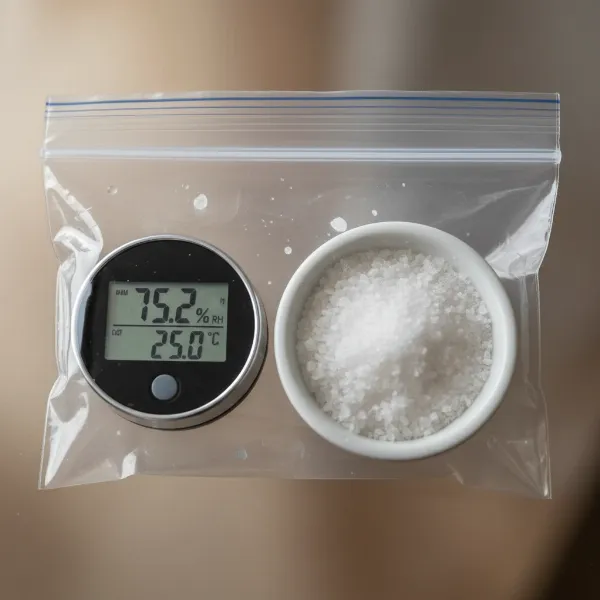 A digital hygrometer undergoing a salt test for calibration inside a clear sealed plastic bag with a small dish of damp salt.
Conclusion
Digital hygrometers are indispensable tools for anyone looking to maintain a balanced and healthy indoor environment. From ensuring personal comfort and protecting respiratory health to preserving valuable household items, these devices provide crucial insights into the invisible world of air moisture. By understanding what a digital hygrometer is, exploring its various types, and learning how to choose, use, and troubleshoot it, you empower yourself to make informed decisions about your living space. Regular monitoring and proactive adjustments, guided by the precise readings of a well-maintained digital hygrometer, are key to creating an optimal atmosphere in your home or workplace. What steps will you take today to master your indoor humidity and unlock the full potential of your environment?
Frequently Asked Questions
How often should I calibrate my digital hygrometer?
It is generally recommended to calibrate your digital hygrometer every 6 to 12 months, or whenever you notice inconsistent readings. Factors like heavy use, exposure to extreme conditions, or a suspicion of inaccurate measurements can warrant more frequent calibration using methods like the salt test.
What is the ideal indoor humidity level?
For optimal health and comfort, most experts, including the EPA, recommend maintaining indoor relative humidity levels between 30% and 50%. Levels slightly higher, up to 60%, can be acceptable in some climates, but going above this can encourage mold and dust mites, while falling below 30% can lead to dry skin and respiratory irritation.
Can a digital hygrometer also measure temperature?
Yes, most modern digital hygrometers are “thermo-hygrometers” and are designed to measure both relative humidity and ambient temperature. This dual functionality is highly convenient, providing a comprehensive overview of your indoor climate on a single display.
Why is my digital hygrometer showing “LO” or “HI”?
When a digital hygrometer displays “LO” or “HI” (or dashes), it usually indicates that the current humidity or temperature in its environment is outside the device’s specified measurement range. This typically means the unit is functioning correctly but the conditions are too extreme for it to provide a numerical reading within its programmed limits.
How do I know if my digital hygrometer is accurate?
The most reliable way to check your digital hygrometer’s accuracy is by performing a salt test. This method creates a stable 75% relative humidity environment. If your hygrometer reads 75% after 8-12 hours in the sealed salt test setup, it is accurate. If it deviates, you’ll know the extent of its inaccuracy and can adjust it if it has a calibration feature, or simply note the offset for future readings.