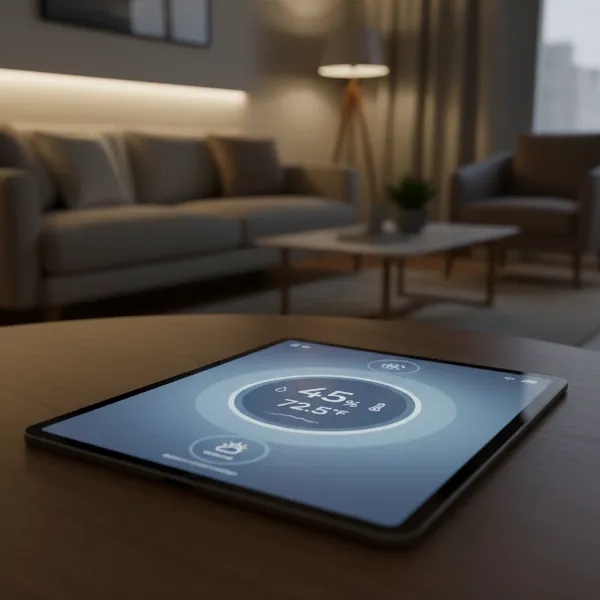
Maintaining an optimal environment in your workspace is crucial, not just for your comfort but also for the longevity of your valuable electronics, documents, and even your health. Overlooked factors like indoor humidity can significantly impact everything from your well-being to the performance of your desk equipment. This guide will walk you through everything you need to know about selecting the perfect digital hygrometer for your desk, ensuring a balanced and productive space.
What is a Digital Hygrometer? Why You Need One for Your Desk
A digital hygrometer is an electronic device designed to measure the amount of moisture, or water vapor, present in the air, commonly expressed as Relative Humidity (RH). Unlike older analog models that rely on physical materials, digital hygrometers utilize advanced electronic sensors, such as capacitive or resistive sensors, to detect subtle changes in humidity and convert them into precise, easy-to-read digital measurements. This real-time data is essential for understanding your environment.
For a desk environment, monitoring humidity is particularly vital. High humidity can encourage mold growth, lead to sticky conditions, and potentially damage sensitive electronics by increasing the risk of condensation or corrosion. Conversely, excessively low humidity can cause dry skin, respiratory discomfort, static electricity that harms computers, and can even warp wooden furniture or dry out paper documents. A reliable digital hygrometer empowers you to maintain ideal humidity levels, safeguarding your health, comfort, and desk investments.
Common Types of Digital Hygrometers
While all digital hygrometers serve the same core function, they come in various designs, each suited for different placement and functional preferences. Understanding these types helps you pinpoint the best fit for your desk setup.
Desktop Digital Hygrometers
These are the most common and often ideal for a desk. They typically feature a built-in stand or easel-back design, allowing them to sit prominently on any flat surface.
- Advantages: Desktop models frequently boast larger, clearer displays that are easy to read at a glance. Many include additional features like integrated clocks, temperature readings, and comfort indicators (dry, comfort, wet), making them multi-functional. Their stable base ensures they remain in place.
- Disadvantages: While convenient, they are generally less portable than smaller, handheld versions and require dedicated desk space.
|
Our Picks for the Best Digital hygrometer in 2026
As an Amazon Associate I earn from qualifying purchases.
|
||
| Num | Product | Action |
|---|---|---|
| 1 | JEDEW 2 Pack Hygrometer Thermometer Digital Humidity Meter Indoor/Outdoor Humidity Monitor Reptile Thermo-Hygrometer for Greenhouse Humidors Terrarium Jars, Fahrenheit (℉) /Celsius(℃) (2) |

|
| 2 | TempPro TP50 2 Pieces Digital Hygrometer Indoor Thermometer Room Thermometer and Humidity Gauge with Temperature Humidity Monitor(Previously ThermoPro) |
|
| 3 | Mini Hygrometer Thermometer Digital Humidity Meter Indoor/Outdoor Humidity Monitor Reptile Thermometer for Greenhouse Garden Cellar Fahrenheit(℉)/ Celsius(℃) 2 Pack |
|
| 4 | TempPro TP49 Digital Hygrometer Indoor Thermometer Humidity Meter Room Thermometer with Temperature and Humidity Monitor Mini Hygrometer Outdoor Thermometer (Previously ThermoPro) |
|
| 5 | TempPro TP49 3 Pieces Digital Hygrometer Indoor Thermometer Humidity Meter Mini Hygrometer with Temperature and Humidity Monitor Outdoor and Room Thermometer Weather Station (Previously ThermoPro) |
|
| 6 | 6-Pack Mini Hygrometer Indoor Humidity Meter, Mini Digital Thermometer Humidity Gauge Meter, Indoor Thermometer Hygrometer Monitor Fahrenheit (℉) for Reptile Thermostat, Jars Reptile, Fridge |
|
| 7 | JEDEW 4 Pack Hygrometer Thermometer Digital Humidity Meter Indoor/Outdoor Humidity Monitor Reptile Thermo-Hygrometer for Greenhouse Humidors Terrarium Jars, Fahrenheit (℉) /Celsius(℃) (4) |
|
| 8 | Humidity Meter Indoor Thermometer 6-Pack Mini Digital Thermometer Hygrometer Indoor Temperature Humidity Meters Gauge LCD Display Fahrenheit (℉) for Greenhouse, Reptile Tank, Cellar, Closet |
|
| 9 | TempPro TP50 Digital Hygrometer Indoor Thermometer Room Thermometer and Humidity Gauge with Temperature Humidity Monitor(Previously ThermoPro) |
|
| 10 | Govee Bluetooth Hygrometer Thermometer, Large LCD, Max/Min Records, 2-Year Data Storage - Black, 2 Pack |
|
Wall-Mounted Digital Hygrometers
Designed to be hung on a wall, these save desk space and are excellent for monitoring the overall room’s humidity. Some desktop models also offer a wall-mounting option.
- Advantages: They provide a fixed, eye-level view of environmental conditions, making them suitable for ambient room monitoring without cluttering your desk.
- Disadvantages: Their fixed position means they are not ideal for specific spot-checking or if you frequently rearrange your workspace. Their readings might be less localized to your immediate desk area.
Portable/Mini Digital Hygrometers
Compact and lightweight, these small devices are designed for maximum mobility. They often come with magnetic backings or small clips.
- Advantages: Extremely versatile, they can be placed almost anywhere—on a metal surface, tucked into a small drawer, or even carried between different rooms. Their small footprint makes them unobtrusive.
- Disadvantages: Typically, they feature smaller screens which can be harder to read from a distance. They might also offer fewer advanced features compared to larger desktop units.
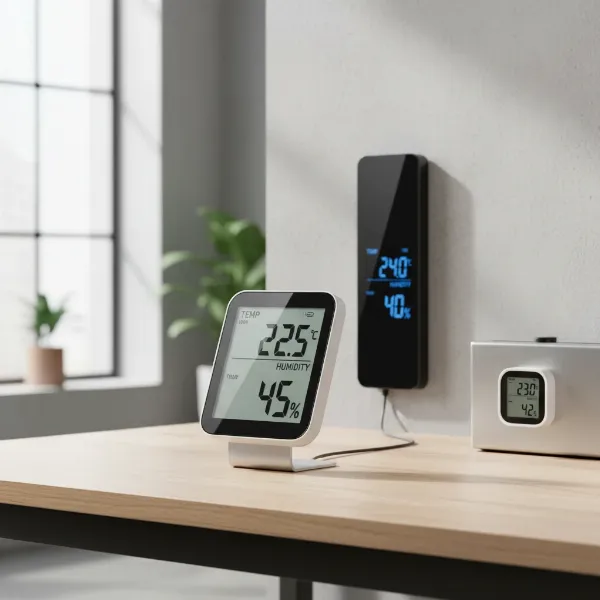 A collection of various digital hygrometers suitable for a desk, including a compact desktop model, a slim wall-mountable version, and a small portable unit, all displaying temperature and humidity.
Top Digital Hygrometers for Desk Use: A Comparison
When evaluating digital hygrometers for your desk, consider how different models stack up across key performance and feature categories. The best choice balances accuracy, readability, and additional functionalities tailored to your specific needs.
| Feature Category | Basic Desk Models | Feature-Rich Desk Models | Smart Desk Models |
|---|---|---|---|
| Accuracy | ±3-5% RH, ±1.5°F | ±1-3% RH, ±0.5-1°F | ±1-2% RH, ±0.3-0.5°F (often Swiss-made sensors) |
| Display Features | Basic digits, small | Larger display, backlight, comfort indicator | Large, high-contrast, customizable, app-controlled |
| Additional Sensors | Temperature only | Temperature, min/max readings, time/date | Temperature, dew point, VPD, historical data logging |
| Connectivity | None | Limited (e.g., wired external sensor) | Bluetooth or Wi-Fi, app integration, alerts |
| Power Source | AAA batteries, shorter life | AAA/CR2477 batteries, longer life | Rechargeable battery or USB, very long life, often includes battery level indicator |
| Convenience | Stand-alone, basic placement | Stand/magnet, easy setup, simple controls | Multiple placement options, remote monitoring, voice assistant compatible, pre-calibrated |
For general desk comfort and basic monitoring, a feature-rich desk model offers excellent value. If precision is paramount for sensitive items or you desire remote access and historical data, a smart desk hygrometer is a superior choice.
Your Buying Guide: Selecting the Right Digital Hygrometer for Your Desk
Choosing the perfect digital hygrometer involves more than just picking the first one you see. It requires a thoughtful assessment of your specific environment and what you hope to achieve with the device.
Define Your Desk Environment Needs
Start by asking yourself what you primarily need the hygrometer for.
- Primary Purpose: Are you looking to enhance personal comfort, protect expensive electronics and documents from extreme conditions, monitor a small plant on your desk, or ensure optimal conditions for musical instruments? Your primary goal dictates the required precision and features.
- Accuracy Requirements: For general comfort, an accuracy of ±2-3% RH is usually sufficient. However, if you are monitoring conditions for a valuable cigar collection, a greenhouse setup, or delicate musical instruments, you might need a device with higher precision, such as ±1% RH.
- Supplemental Features: Do you need more than just current humidity and temperature? Features like min/max records, trend tracking, comfort level indicators, or audible alerts for out-of-range conditions can be incredibly useful depending on your needs.
Essential Factors to Consider When Selecting a Digital Hygrometer
Once you’ve defined your needs, focus on these critical attributes to find your ideal desk companion:
- Accuracy and Response Time: A hygrometer’s accuracy, typically stated as ±RH%, is paramount. Look for models with accuracy within ±1-3% RH for reliable readings. Equally important is the response time—how quickly the device registers changes in humidity. A fast response time (e.g., every 10-30 seconds) ensures you have up-to-date information.
- Display Clarity and Features: For a desk device, an easy-to-read display is non-negotiable. Look for large, bold numbers, clear indicators for humidity and temperature, and a backlight for visibility in low-light conditions. Many models include a comfort level icon (dry, comfort, wet) which provides a quick visual cue of your environment.
- Form Factor and Placement Options: Consider the size and design. Will it fit neatly on your desk without taking up too much space? Does it have a sturdy kickstand? Some models offer magnetic backings for attaching to metal surfaces or wall-mount options, providing flexibility in placement.
- Power Efficiency and Source: Digital hygrometers typically run on batteries (AAA, AA, or button cells like CR2032/CR2477). Check the stated battery life, as frequent battery changes can be inconvenient. Some advanced models may offer USB power or rechargeable options.
- Connectivity and Smart Features: For those who desire more advanced monitoring, consider models with Bluetooth or Wi-Fi connectivity. These allow you to view data, receive alerts, and track historical trends via a smartphone app, even when you’re away from your desk. This is particularly useful for continuous monitoring or managing conditions in multiple areas.
- Calibration and Maintenance: While many digital hygrometers come pre-calibrated from the factory, the ability to perform periodic calibration or an easy recalibration process helps ensure long-term accuracy. Reviewing user feedback on calibration ease can be helpful.
Budget Considerations
Digital hygrometers vary widely in price, and your budget will influence the features you can expect.
- Entry-Level (Under $15-20): These often provide basic humidity and temperature readings with decent accuracy and a simple display. They are excellent for general comfort monitoring.
- Mid-Range ($20-50): This segment offers improved accuracy, larger backlit displays, min/max records, comfort indicators, and sometimes Bluetooth connectivity for basic app functions.
- High-End ($50+): Premium models typically boast the highest accuracy, robust data logging capabilities, Wi-Fi connectivity for remote monitoring, advanced sensors, and often a more durable build quality.
How to Use and Maintain Your Digital Hygrometer
Once you have your digital hygrometer, proper usage and maintenance will ensure its longevity and accuracy.
To begin, allow your new hygrometer to acclimate to its environment for at least 15-30 minutes, or even a few hours, before taking its first reading. This allows the sensors to stabilize and adjust to the surrounding conditions. For optimal placement on your desk, position it away from direct sunlight, heating or cooling vents, windows, and humidifiers/dehumidifiers. These locations can provide skewed readings due to localized temperature and humidity fluctuations. A central spot on your desk or a nearby shelf is usually ideal for measuring the ambient conditions of your immediate workspace.
Operating most digital hygrometers is straightforward: simply power it on, and it will immediately display current humidity and temperature. Familiarize yourself with any additional buttons for features like viewing min/max records or toggling temperature units (°C/°F).
For maintenance, periodically check and replace batteries as needed, typically every 6-18 months depending on the model and usage. Keep the device clean by wiping it with a soft, dry cloth; avoid harsh chemicals or water that could damage the electronics. While many digital hygrometers don’t require frequent user calibration, if you suspect inaccurate readings, consult the user manual for instructions on how to recalibrate or verify its accuracy against a known standard.
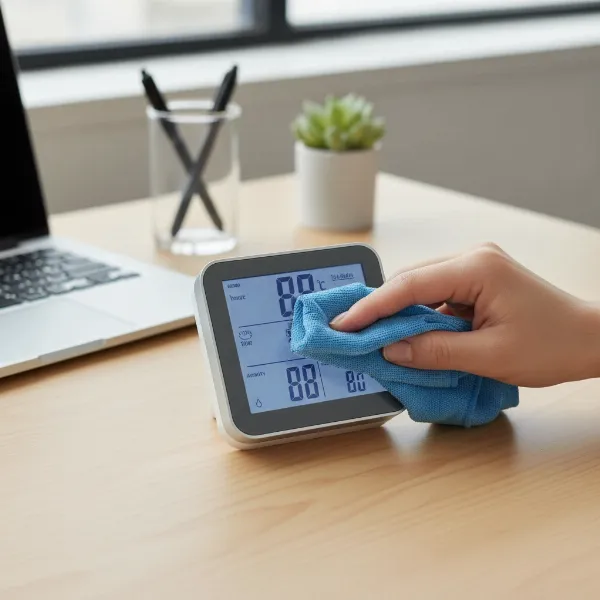 A hand cleaning a digital hygrometer on a desk with a soft cloth, illustrating proper maintenance, with other desk items blurred in the background.
Troubleshooting Common Digital Hygrometer Issues
Even the most reliable digital hygrometers can occasionally encounter issues. Understanding how to troubleshoot common problems can save you time and ensure continuous accurate monitoring.
Inaccurate Readings: If you suspect your hygrometer isn’t displaying correct values, first verify its placement. Ensure it’s not near heat sources, direct sunlight, drafts, or directly next to a humidifier/dehumidifier, as these can cause localized microclimates that don’t reflect the general room conditions. If placement isn’t the issue, try recalibrating the device if your model supports it. A common DIY calibration method involves the “salt test” (placing the hygrometer in a sealed bag with a saturated salt solution), which should yield a specific humidity reading after several hours.
No Display or Power Issues: The most common cause for a blank or flickering display is depleted batteries. Check the battery compartment, replace old batteries with fresh ones, and ensure they are inserted with the correct polarity. If the device uses a USB power source, check the cable connection and try a different power adapter or USB port.
Slow Response Time: If your hygrometer seems sluggish in updating its readings, it might still be acclimating to a new environment, especially after a significant change in temperature or humidity. Give it more time. Ensure the sensor vents are not obstructed by dust or debris, which can impede airflow and sensor performance. A gentle cleaning around the sensor area (as per the manufacturer’s instructions) might resolve this. For models with smart features, also check for any firmware updates that could improve performance.
Conclusion
Choosing the right digital hygrometer for your desk is a smart investment in creating a healthier, more comfortable, and protective workspace. By understanding what these devices do, considering their various types, and carefully evaluating features like accuracy, display, and smart capabilities, you can confidently select a model that perfectly suits your needs. From safeguarding your sensitive electronics to preventing discomfort from dry air, a quality digital hygrometer puts you in control of your immediate environment. Take charge of your desk’s climate today and experience the difference optimal humidity can make. What small change will you make to your workspace after adding a digital hygrometer?
Frequently Asked Questions
What is the ideal humidity level for an office or home desk?
The ideal relative humidity for most indoor environments, including an office or home desk, is generally between 40% and 60%. This range is considered comfortable for people and helps protect electronics, wooden furniture, and documents from damage due to excessively dry or humid conditions.
Can a digital hygrometer also measure temperature?
Yes, most digital hygrometers designed for indoor use are combined with a thermometer, providing both humidity and temperature readings on a single display. This dual functionality offers a comprehensive overview of your immediate environmental conditions at your desk.
How often should I check my digital hygrometer?
For general comfort and monitoring, checking your digital hygrometer once or twice a day is often sufficient. However, if you have sensitive items like musical instruments or specific health concerns, or if there are significant weather changes, more frequent checks or a model with alert features might be beneficial.
Is calibration necessary for a new digital hygrometer?
Many modern digital hygrometers come pre-calibrated from the factory and are accurate out of the box. However, over time or if you suspect inaccuracies, periodic recalibration may be necessary to maintain optimal precision. Consult your device’s manual for specific calibration instructions or recommendations.
Can humidity damage my desk electronics?
Yes, both very high and very low humidity can harm electronics. High humidity can lead to condensation and corrosion, while low humidity can cause static electricity discharges that damage sensitive components. A digital hygrometer helps you maintain safe humidity levels to protect your devices.