Maintaining optimal indoor humidity levels is more than just a comfort preference; it’s a critical aspect of safeguarding your health, preserving your home’s integrity, and protecting valuable possessions. Whether you’re a plant enthusiast, a proud owner of a cigar humidor, or simply concerned about mold growth and dry skin, understanding the moisture content in your environment is key. This comprehensive review dives deep into the world of digital hygrometers, exploring their functionality, benefits, and whether investing in one truly pays off. We’ll uncover what makes these devices indispensable for modern homes and help you determine the best fit for your specific needs.
What is a Digital Hygrometer and Why Do You Need One?
A digital hygrometer is an electronic device designed to measure the relative humidity (RH) in the air, typically displaying the reading as a percentage. Unlike older analog models that rely on mechanical coils or hair, digital hygrometers use electronic sensors to detect changes in moisture, providing precise and often instantaneous readings. Many models also integrate temperature sensors, giving you a complete environmental overview. This ability to accurately monitor humidity is vital for several reasons.
Firstly, your health can be significantly impacted by unbalanced humidity. Levels that are too high can foster mold and mildew growth, triggering allergies, asthma, and respiratory issues. Conversely, excessively low humidity can lead to dry skin, irritated sinuses, static electricity, and increased susceptibility to colds and flu. Secondly, humidity affects your home and belongings. Wooden furniture, musical instruments, and flooring can warp, crack, or swell with fluctuating moisture. Electronics can suffer damage, and even the structural integrity of your home can be compromised by persistent dampness. For collectors of cigars, wine, or even specific plants, maintaining a narrow humidity range is paramount to preserving quality and preventing spoilage. Digital hygrometers offer the precision needed for these sensitive applications, ensuring you have reliable data to make informed adjustments to your environment, whether through humidifiers, dehumidifiers, or ventilation.
Common Types of Digital Hygrometers
Digital hygrometers come in various designs, each suited for different applications and user preferences. Understanding these types can help you pinpoint the best device for your monitoring needs.
Desktop Digital Hygrometers
These are perhaps the most common type, designed to sit on a flat surface like a table, shelf, or counter. They often feature larger, easy-to-read displays and may include additional functionalities such as min/max humidity records, comfort level indicators, and even alarm functions.
- Advantages: Typically offer large, clear displays, often with backlighting, making them easy to read from a distance. Many models boast multiple features and are generally very user-friendly.
- Disadvantages: Less portable than handheld units and usually require a fixed power source or battery, which limits their placement in remote areas without a stable surface.
|
Our Picks for the Best Digital hygrometer in 2026
As an Amazon Associate I earn from qualifying purchases.
|
||
| Num | Product | Action |
|---|---|---|
| 1 | JEDEW 2 Pack Hygrometer Thermometer Digital Humidity Meter Indoor/Outdoor Humidity Monitor Reptile Thermo-Hygrometer for Greenhouse Humidors Terrarium Jars, Fahrenheit (℉) /Celsius(℃) (2) |

|
| 2 | TempPro TP49 Digital Hygrometer Indoor Thermometer Humidity Meter Room Thermometer with Temperature and Humidity Monitor Mini Hygrometer Outdoor Thermometer (Previously ThermoPro) |
|
| 3 | TempPro TP49 3 Pieces Digital Hygrometer Indoor Thermometer Humidity Meter Mini Hygrometer with Temperature and Humidity Monitor Outdoor and Room Thermometer Weather Station (Previously ThermoPro) |
|
| 4 | Govee Bluetooth Hygrometer Thermometer, Large LCD, Max/Min Records, 2-Year Data Storage - Black, 2 Pack |
|
| 5 | JEDEW 4 Pack Hygrometer Thermometer Digital Humidity Meter Indoor/Outdoor Humidity Monitor Reptile Thermo-Hygrometer for Greenhouse Humidors Terrarium Jars, Fahrenheit (℉) /Celsius(℃) (4) |
|
| 6 | Humidity Meter Indoor Thermometer 6-Pack Mini Digital Thermometer Hygrometer Indoor Temperature Humidity Meters Gauge LCD Display Fahrenheit (℉) for Greenhouse, Reptile Tank, Cellar, Closet |
|
| 7 | TempPro TP50 Digital Hygrometer Indoor Thermometer Room Thermometer and Humidity Gauge with Temperature Humidity Monitor(Previously ThermoPro) |
|
| 8 | Mini Hygrometer Thermometer Digital Humidity Meter Indoor/Outdoor Humidity Monitor Reptile Thermometer for Greenhouse Garden Cellar Fahrenheit(℉)/ Celsius(℃) 2 Pack |
|
| 9 | 6-Pack Mini Hygrometer Indoor Humidity Meter, Mini Digital Thermometer Humidity Gauge Meter, Indoor Thermometer Hygrometer Monitor Fahrenheit (℉) for Reptile Thermostat, Jars Reptile, Fridge |
|
| 10 | TempPro TP50 2 Pieces Digital Hygrometer Indoor Thermometer Room Thermometer and Humidity Gauge with Temperature Humidity Monitor(Previously ThermoPro) |
|
Wall-Mounted Digital Hygrometers
For those looking to save space or achieve a permanent monitoring solution, wall-mounted digital hygrometers are an excellent choice. These devices are designed to be hung on a wall, often blending seamlessly with home decor.
- Advantages: Space-saving and provide a consistent reading from a fixed point. Some models can be easily repositioned if needed, and their visibility can serve as a constant reminder to check humidity levels.
- Disadvantages: Requires a specific mounting location, which might not be ideal for users who need to take readings in various rooms. Installation might involve adhesive or small nails.
Portable Digital Hygrometers
Compact and lightweight, portable digital hygrometers are perfect for monitoring humidity on the go or in multiple locations. These can range from small, keychain-sized devices to slightly larger, battery-powered units.
- Advantages: Highly mobile and versatile, allowing you to check humidity in different rooms, travel humidors, instrument cases, or outdoor shelters. Many are battery-operated, offering true wireless flexibility.
- Disadvantages: Often have smaller screens, which can be harder to read, and may come with fewer advanced features compared to their desktop counterparts. Battery life can also be a consideration with frequent use.
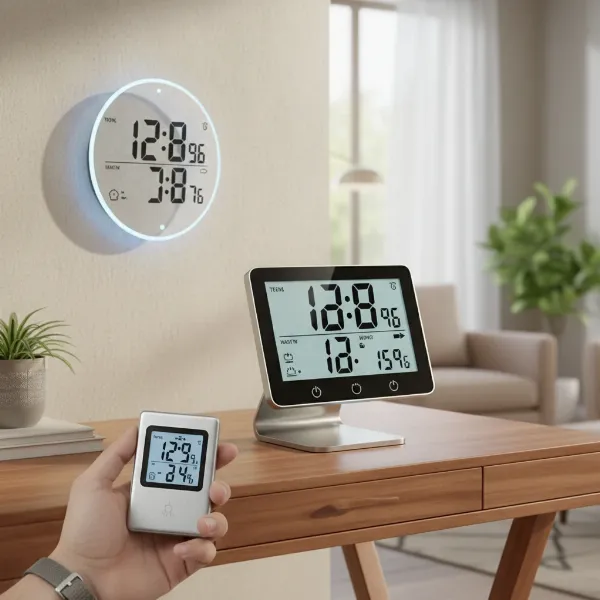 Different types of digital hygrometers including desktop, wall-mounted, and portable models for various uses
Comparison Table: Top Digital Hygrometers Today
Choosing the best digital hygrometer involves sifting through numerous options, each with its unique strengths. Here’s a comparison of some highly-rated models that stand out for their accuracy, features, and user satisfaction.
| Brand & Model | Price Range* | Accuracy (RH) | Key Features | User Rating (out of 5) |
|---|---|---|---|---|
| Govee H5051 Wi-Fi Indoor Hygrometer | Mid-High | ±3% | Wi-Fi/Bluetooth, App alerts, Data logging (2 years), Calibration, Backlight | 4.5 |
| SensorPush HT.w Temp/Humidity Sensor | High | ±2% | Bluetooth (325 ft), Water-resistant, Unlimited in-app data, Easy calibration | 4.6 |
| ThermoPro TP49 Digital Hygrometer | Low | ±2-3% | Compact, 10-sec refresh, Comfort indicator, 18-month battery | 4.6 |
| ThermoPro TP55 Jumbo Touchscreen | Mid | ±2-3% | Large touchscreen, Backlight, Min/Max records, Trend indicators | 4.6 |
| AcuRite 01080M Pro | Low-Mid | ±2-3% | Professional accuracy, Manual calibration, 24-hr/all-time records | 4.3 |
*Price ranges are approximate and can vary.
The Govee H5051 is an excellent overall choice for its smart features, offering Wi-Fi and Bluetooth connectivity, app alerts, and robust data logging, which is incredibly useful for long-term monitoring. For those needing superior range and water resistance, the SensorPush HT.w stands out with its 325-foot Bluetooth range and unlimited data storage, though it comes at a higher price point. If affordability and simplicity are your priorities, the ThermoPro TP49 delivers reliable accuracy and a long battery life in a compact form. The ThermoPro TP55 is a favorite for its large, easy-to-read touchscreen and essential features like min/max records, making it ideal for general home use. Lastly, the AcuRite 01080M Pro offers professional-grade accuracy with manual calibration options, ensuring consistent reliability for critical applications. Each of these models provides a distinct blend of features and value, catering to a wide array of user needs.
How to Choose the Right Digital Hygrometer (Buying Guide)
Selecting the ideal digital hygrometer can feel overwhelming with the myriad of options available. By considering a few key factors, you can narrow down your choices and find a device that perfectly aligns with your requirements.
Determine Your Usage Needs
Before diving into specifications, consider where and how you intend to use your hygrometer. Are you monitoring a single room, a large house, or specific containers like a cigar humidor or a guitar case? For a single room, a basic desktop or wall-mounted unit might suffice. If you need to monitor multiple areas or specific, enclosed spaces, a smart hygrometer with multiple sensors or a portable unit would be more practical. Precision requirements also vary; a general home environment might only need readings within a few percentage points, while a cigar collector might demand accuracy to within 1% RH. Do you need historical data logging, or are real-time readings enough? Features like alarm functions, which notify you when humidity exceeds a preset range, are crucial for sensitive environments.
Key Factors to Consider When Buying
- Accuracy and Resolution: Digital hygrometers typically offer accuracy within ±1% to ±5% RH. For general household use, ±3% is usually sufficient, but for sensitive items, aim for ±1-2% accuracy. Resolution refers to how finely the device displays readings (e.g., 0.1% RH).
- Measurement Range: Ensure the hygrometer can measure humidity and temperature within the expected range of your environment. Most standard units cover 10-99% RH and typical room temperatures, but specialized units might have broader or narrower ranges.
- Response Time: A faster response time means the device updates readings more quickly, which is beneficial for monitoring rapid changes. Some models refresh every few seconds, while others might take up to a minute.
- Battery Life (for wireless models): If you opt for a battery-powered or smart wireless model, check the estimated battery life. Longer battery life reduces the frequency of replacements, adding convenience.
- Display: Look for a clear, easy-to-read display. Large numbers, backlighting, and comfort indicators (e.g., dry, comfort, wet icons) enhance usability.
- Smart Features and Connectivity: Many modern digital hygrometers offer Bluetooth or Wi-Fi connectivity, allowing you to monitor readings remotely via a smartphone app. These apps often provide data logging, trend analysis, and customizable alerts, which are invaluable for proactive humidity management.
- Brand and Reviews: Reputable brands often offer better accuracy, durability, and customer support. Always check user reviews for real-world insights into a product’s performance and reliability.
Budget
Digital hygrometers are available across a wide price spectrum.
- Entry-level (Under $20): These typically offer basic humidity and temperature readings with decent accuracy for general use. They might lack advanced features like backlighting or smart connectivity.
- Mid-range ($20-$50): This segment provides a good balance of features, accuracy, and price. You’ll find larger displays, min/max records, backlighting, and sometimes Bluetooth connectivity.
- High-end ($50+): These devices often boast superior accuracy, Wi-Fi connectivity, extensive data logging, advanced app integrations, and robust build quality, suitable for professional or highly sensitive applications.
By carefully evaluating these factors against your specific needs, you can confidently choose a digital hygrometer that offers the best value and performance.
How to Use and Maintain Your Digital Hygrometer
Getting accurate readings from your digital hygrometer and ensuring its longevity requires proper usage and regular maintenance.
To begin, placement is crucial. Avoid positioning the hygrometer near heat sources (like radiators, direct sunlight, or electronics), air conditioning vents, or open windows, as these can skew readings. Similarly, avoid areas with restricted airflow, such as behind furniture or doors. For the most accurate ambient readings, place the device in a central location within the area you wish to monitor, ideally at mid-level, away from direct drafts.
Calibration is essential to ensure your hygrometer remains accurate over time, as sensors can drift. The most common and reliable method for home users is the salt test.
- Prepare the Salt Solution: Mix about half a cup of table salt with a quarter cup of water in a small, shallow container (e.g., a bottle cap). Stir until the salt is thoroughly wet but not completely dissolved into a liquid paste.
- Seal the Setup: Place the container with the salt solution and your digital hygrometer inside a re-sealable airtight plastic bag or container. Ensure the hygrometer does not touch the salt solution.
- Wait and Read: Seal the bag tightly and leave it undisturbed in an area with a stable room temperature for 8 to 12 hours (some recommend up to 24 hours). After this period, the humidity inside the sealed environment should stabilize at approximately 75% RH.
- Calibrate: While still in the bag, check your hygrometer’s reading. If it reads 75% RH, it’s accurate. If it differs, note the reading. Many digital hygrometers have a calibration button that allows you to adjust the reading directly to 75%. If yours doesn’t, note the difference (e.g., if it reads 72%, it’s -3%; if 78%, it’s +3%). In the future, you’ll need to manually add or subtract this offset from your readings.
Calibrate your hygrometer at least once a year, or more frequently (every three to six months) if it’s used in environments with extreme humidity fluctuations.
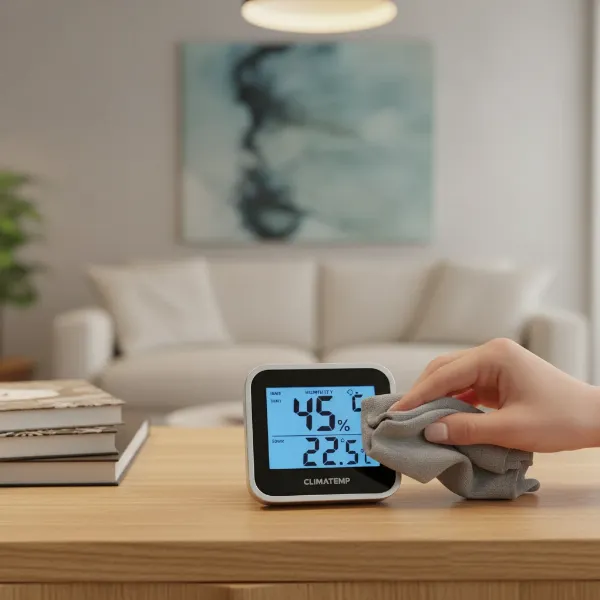
For maintenance, keep the sensor area clean from dust and debris, as contaminants can affect accuracy. Use a soft, dry cloth for cleaning the device exterior. For battery-powered units, regularly check battery health and replace batteries when indicators show low power, as weak batteries can lead to inaccurate readings. Proper storage in a dry, stable environment when not in use also helps prolong the device’s lifespan and maintains sensor integrity.
Common Issues and Troubleshooting Digital Hygrometers
Even with proper care, you might encounter issues with your digital hygrometer. Here are some common problems and straightforward ways to troubleshoot them.
One of the most frequent complaints is inaccurate readings. This can stem from several factors:
- Sensor Drift: Over time, the electronic sensors can naturally lose their precision. This is why regular calibration using the salt test method is essential. If your hygrometer can be calibrated, adjust it back to 75% RH after the test. If not, consistently apply the noted offset to your readings.
- Poor Placement: As discussed, placing the device too close to heat sources, cold drafts, direct sunlight, or in areas with stagnant air can cause false readings. Relocate the hygrometer to a more central, stable spot with good airflow.
- Low Battery: For battery-operated models, a low battery can lead to erratic or incorrect readings. Always ensure the batteries are fresh, or replace them if you suspect they are running low.
Condensation on the sensor can also cause readings to be unusually high. This often happens in environments with rapid temperature drops or very high humidity. If you see condensation, gently wipe the device dry and allow it to acclimate to the environment for an hour or two before taking further readings. Consider improving ventilation in the area to prevent excessive moisture buildup.
If your device is showing no reading or a blank screen, first check the batteries to ensure they are correctly inserted and charged. If it’s a new device, remove any protective plastic tabs from the battery compartment. Some models might have a small reset button that can resolve minor glitches. Consult your user manual for specific troubleshooting steps for your model.
Lastly, inconsistent readings where the humidity fluctuates wildly in a seemingly stable environment could indicate a faulty sensor or a need for immediate calibration. If calibration doesn’t resolve the issue and the readings remain erratic compared to a known baseline (like another calibrated hygrometer), the device might be at the end of its lifespan and require replacement. Remember that proper sealing around cable feedthroughs for wall-mounted sensors can also prevent pressure differences that lead to inaccurate readings.
Conclusion
Is a digital hygrometer worth the investment? Absolutely. For maintaining a healthy indoor environment, protecting valuable items, and ensuring the structural integrity of your home, accurate humidity monitoring is invaluable. Digital hygrometers offer superior precision, readability, and a range of smart features that far surpass their analog counterparts, all at an increasingly affordable price point. From keeping your cigars perfectly conditioned to preventing mold in your basement, these devices empower you to take control of your environment. By understanding the different types, knowing how to choose wisely, and following simple maintenance and troubleshooting tips, a digital hygrometer becomes an indispensable tool in your home management arsenal.
So, are you ready to unlock the benefits of precise humidity control and enhance your living space?
Frequently Asked Questions
How accurate are digital hygrometers compared to analog ones?
Digital hygrometers are generally much more accurate than analog models, typically providing readings within ±1-3% relative humidity. Analog hygrometers, relying on mechanical components, usually have a wider margin of error, often around ±5% RH. This makes digital versions far more reliable for critical applications.
Do digital hygrometers need calibration?
Yes, digital hygrometers do need calibration. Over time, the electronic sensors can experience drift, leading to inaccurate readings. It’s recommended to calibrate your digital hygrometer at least once a year, or more frequently in environments with extreme humidity fluctuations, using methods like the salt test.
What is the ideal humidity level for a home?
The ideal indoor humidity level for most homes is generally between 40% and 60% relative humidity. Maintaining humidity within this range helps prevent mold growth, reduces allergens, protects wooden furnishings, and contributes to overall comfort and health for occupants.
Can a digital hygrometer help with plant care?
Absolutely. Many plant species, especially tropical ones, thrive within specific humidity ranges. A digital hygrometer allows gardeners to precisely monitor and adjust the humidity levels in greenhouses, grow tents, or around individual plants, promoting healthier growth and preventing issues like wilting or fungal infections.
What features should I look for in a smart digital hygrometer?
For a smart digital hygrometer, look for features like Bluetooth or Wi-Fi connectivity for remote monitoring via an app, data logging capabilities to track historical trends, customizable alerts for high or low humidity, and integration with smart home systems. A clear app interface and good battery life are also significant advantages.